
CPPS Quarterly Security Audit Procedure
Use: Directions to perform the quarterly audit procedure in the Colorado Personnel Payroll System (CPPS)
Accessing the Report
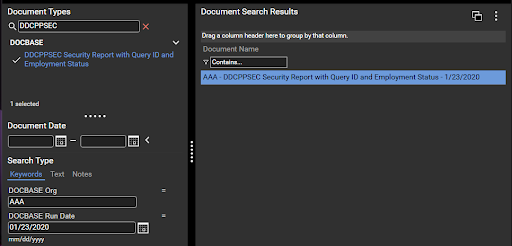
- The agency user will be able to search for the report by typing “DDCPPSEC” into the Document Types field
- Select the “DDCPPSEC Security Report with Query ID and Employment Status” report
- In the section below, there are a few options in how to search for your agency specific report and date
- Central Payroll recommends entering the three character CPPS ORG in the DOCBASE Org field (In this example, AAA for Department of Personnel & Administration)
- Alternatively, if your user access is setup with the proper security, you can just enter a * in the DOCBASE Org field
- Central Payroll recommends entering the three character CPPS ORG in the DOCBASE Org field (In this example, AAA for Department of Personnel & Administration)
- For dates, you can either utilize the Document Date From/To fields (left blank in this example) or the DOCBASE Run Date field (1/23/2020 in this example)
- DOCBASE Run Date will be one business day prior to the date you want the report
- This field can also utilize an * but would be less useful as you will only want the most current report for the purpose of this audit
- For the quarterly audit, please use the last day of the quarter being reviewed as the DOCBASE Run Date
Downloading Report
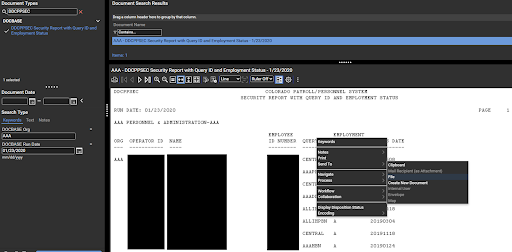
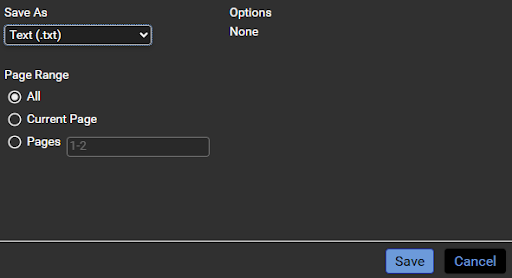
To download the report as a .txt file, the user will need to:
- Right click anywhere on the displayed report → Sent To → File
- From the dropdown select Text (.txt)
Reading Report
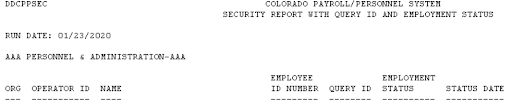
- Run Date: The date the report was created
- Corresponds to DOCBASE Run Date in OnBase.
- Org: CPPS Organization for listed employees
- Corresponds to DOCBASE Org in OnBase
- Operator ID: CPPS system user name for the given employee
- Name: Employee’s Name
- Employee ID Number: The nine digit employee identification number for the given employee
- Query ID: The security code that governs the access the given employee has
- Most agencies have several different options for this value depending on functional area and level of responsibility
- If your agency needs clarification on their valid values, please reach out to state_centralpayroll@state.co.us
- Employment Status: The CPPS Status of the given employee
- You should submit a disable access request for any status outside of “A” with limited exception
- Status Date: The date the employment status was last updated