
CORE Federal Tax Reporting Guide
Note: Provided below is guidance intended for State departmental and program use only. To view more guidance and policy information, please visit the Central Accounting and Vendor Operations page.
CORE Federal Tax Reporting Guide
Introduction: Central Accounting and Vendor Operations (CAVO) within the Office of the State Controller (OSC) reports and issues 1099s for CORE payments. When a vendor is paid in CORE, depending on the Object Code of the payment and 1099 Classification of the vendor, it may be reportable on a 1099-MISC, 1099-INT, or 1099-NEC. CAVO issues these forms to vendors and reports to the Internal Revenue Service (IRS) in January for the preceding tax year. Vendors need these forms to file their tax returns. Additionally, the state must comply with federal tax code or be subject to fines and penalties, so it is critical that 1099 reporting is done timely and accurately. Unless adjusted with a journal entry, payments made on miscellaneous vendor records are never reported. Per OSC Vendor Policy, payments made on miscellaneous vendor records must not be recurring or 1099 reportable. Generally the IRS does not mind if payers (e.g. the State of Colorado) overreport, but fines and penalties may be assessed for underreporting.
Table of Contents
Section I: IRS Form W-9 and Federal Tax Classification
Section II: Income Types and Reporting Requirements
Section III: Tracking 1099 Reportable Payments
Section IV: Filing Dates, 1099 Corrections/Copies
Section V: Adjustments, Fixing Coding Errors in CORE
Appendix A: Object Code Lookup Table
Appendix B: Frequently Asked Questions
Appendix C: IRS Links and CAVO Resources
Section I: IRS Form W-9 and Federal Tax Classification
Federal tax reporting starts with IRS Form W-9 – Request for Taxpayer Identification Number (TIN) and Certification. A W-9 is used to create vendor records in CORE, and CAVO has W-9s on file for nearly every active vendor. We recommend using the latest State Substitute W-9, which is located on the internal CORE Resources and Help site, within the Disbursement Forms page.
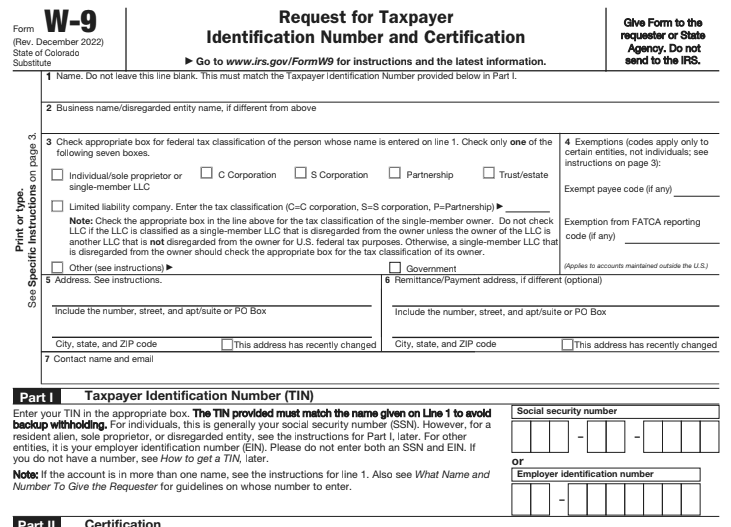
This form is based on the IRS October 2018 revision. Generally any W-9 is acceptable as long as it’s filled out correctly, signed and dated within the past year, and contains FATCA reporting information (most revisions since 2013 do). The name on Line 1 and TIN in Part I must match per the IRS. If payments are not correctly reported to the IRS, the state may receive a backup withholding (“B”) notice from the IRS and may be subject to fines and penalties.
Part I (TIN) must contain EITHER a Social Security Number (SSN) OR an Employer Identification Number (EIN). With a W-9, a vendor is essentially telling us how they want us to report their income to the IRS. We will not double report under an SSN and EIN, so the vendor should only provide one or the other. Vendors that have both an SSN and EIN generally, but not always, prefer to use their EIN.
The federal tax classification in line 3 is also very important. Different types of payments report differently for different types of tax classifications. For example Object Code 1920 (Professional Services - Professional) reports as Nonemployee Compensation for individuals and partnerships, but not corporations. Object Code 1940 (Personal Services - Medical Services) reports as Medical and Health Care Payments for individuals, partnerships, and corporations, but not for governments or not-for-profits.
If the vendor marks Limited Liability Company (LLC), please make sure they have provided their filing type (C, S, or P). A vendor’s tax classification can be found on the VCUST table in CORE:
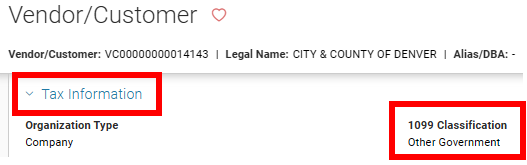
If it looks like an existing vendor’s 1099 Classification is incorrect or does not match the W-9 they’ve provided, please email CAVO’s shared email box, state_centralapproval@state.co.us.
All 997*E employee records have a non-reportable 1099 Classification of Employee. These are for employee travel/mileage and reimbursement payments only. If an employee is working as an independent contractor and receiving Nonemployee Compensation or other reportable income types, then a vendor record (non-997*E record, typically starting with VC*) is needed.
Section II: Income Types and Reporting Requirements
The below table is an overview of the types of income CAVO reports.
| Form | Box | IncomE Type | Threshold | Corp? |
|---|---|---|---|---|
| 1099-INT | 1 | Interest Income | $10 | Yes |
| 1099-INT | 8 | Tax Exempt Interest | $10 | Yes |
| 1099-MISC | 1 | Rents | $600 | No |
| 1099-MISC | 2 | Royalties | $10 | No |
| 1099-MISC | 3 | Other Income | $600 | No |
| 1099-MISC | 6 | Medical and Health Care Payments | $600 | Yes |
| 1099-MISC | 10 | Gross Proceeds Paid to an Attorney | $600 | Yes |
| 1099-NEC | 1 | Nonemployee Compensation | $600 | No* |
* with the exceptions of legal and litigation services (Object Codes 1930 and 1935), which ARE reportable for Corporations
Form 1099-NEC was new for tax year 2020. Nonemployee compensation was previously reported in box 7 on form 1099-MISC.
A 1099 will be issued as long as the total reportable amounts paid to the vendor during the tax year are greater than the threshold. The types of payments in the above table are reportable for vendors with a federal tax classification of individual, trust, sole proprietor, or partnership. The last column on the table indicates whether the income type is also reportable for corporations. Note that nonemployee compensation related to legal or litigation services is also reportable for
corporations.
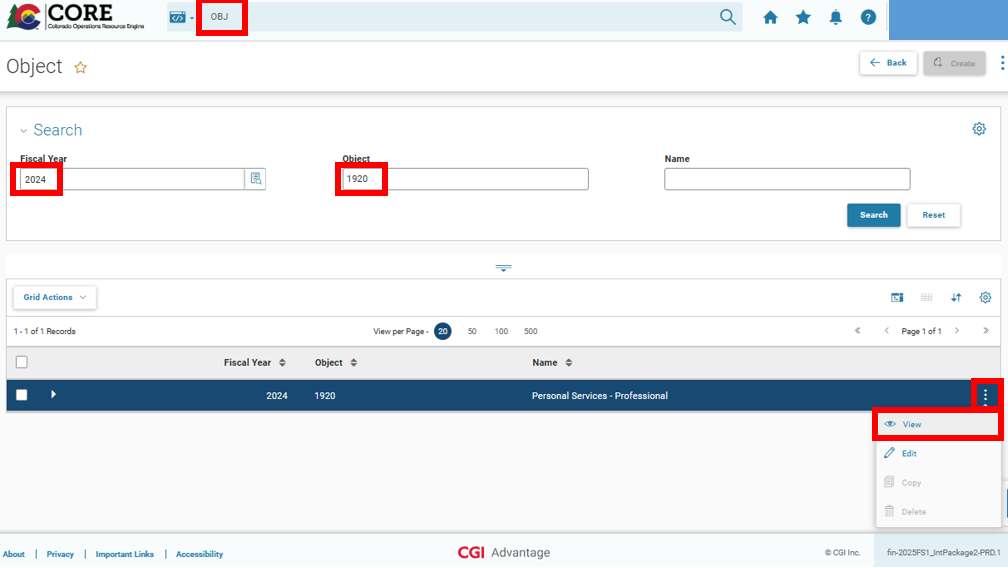
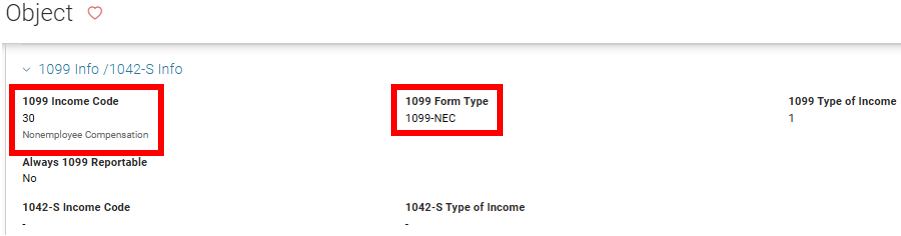
In CORE, an Expenditure Object Code (OBJ) describes the good or service involved in any applicable transaction. This determines the Income Type for 1099 reporting purposes. Appendix A contains an Object Code Lookup Table and lists 1099 reportable object codes and their IRS Form and Income Type. You can also view the OBJ table in CORE (set the Global Search Bar to Page Code and enter OBJ). Enter a Fiscal Year, then search by Object Code or Name. Click the vertical three-dot menu, then click View. Expand the 1099 Info area, which shows the 1099 Form Type and Income Type.
Section III: Tracking 1099 Reportable Payments
There are many InfoAdvantage reports to assist departments with tracking, researching, and validating 1099 payments. The reports are located in the CORE Reports > StateWide Reports > Vendor folder. While they have a variety of prompts, most of them require a range of record dates.
Federal taxes are always reported and paid based on the calendar year January 1st through December 31st (also known as tax year), so when entering the beginning of the range or start / from date, use January 1st. The year will usually be the current year unless you are looking for reportable payments made in a previous tax year. When entering the end of the range or end / to date, use either the current date if pulling transactions from this year, or December 31st if pulling transactions from a previous year. You should also specify either cabinet or department code(s). If you want to research 1099 amounts for a specific vendor, we recommend using Vendor ID (i.e. vendor code).
VEND-002 – 1099 Reportable Transactions is the most useful 1099 report. It lists 1099 reportable payments and journal entries that will be used to generate 1099-INT/MISC/NEC forms in early January for the preceding tax year. You can think of it as a draft 1099 that the vendor can expect to receive in late January or early February due to payments made by the specified cabinet or department code prompts. Please note the tabs at the bottom of the report. The first two tabs are for Individuals, Trusts, Sole Proprietorships, and Partnerships. These entities will receive 1099s for all of the income types listed in the table in Section II if one or more types meet the corresponding thresholds.
The first tab lists a summary by vendor, and the second tab lists individual transactions. The second two tabs are for Corporations. Please be sure to check all four tabs when reviewing reports. If you want to export and save the report, choose Export Document As > to export all four tabs and the Cover Page. Export Current Report only saves the tab you are currently viewing.
VEND-008 - 1099 Reportable OBJ Code Transactions using Misc Vendor helps ensure that you are not underreporting your payments. Recall that the IRS is fine with payers (e.g the State of Colorado) overreporting, but fines and penalties may be assessed for underreporting. This report lists all transactions with reportable object codes made on a Miscellaneous Account vendor record (e.g. AAAA100000 or KAAA100000). These transactions never report unless they are adjusted with a journal entry (see Section V) and moved to an active, non-Miscellaneous vendor record.
Per OSC Vendor Policy, payments made on miscellaneous records must not be recurring or 1099 reportable, but there are certain acceptable departmental processes where payment is first made on the miscellaneous account then adjusted later. The VEND-008 report can also help identify coding errors or if the miscellaneous vendor was used in error.
VEND-007 - 1099 Non-Reportable OBJ Code Transactions is the inverse of VEND-001. It lists payments made with non-reportable object codes, regardless of a vendor’s 1099 Classification. This report can also be useful in identifying coding errors when reviewing individual records. If you see a payment on this report that was actually for a reportable type of income or transaction, then an incorrect object code was used. A journal entry is needed to adjust and correct the object code.
VEND-001 - 1099 OBJ Code Transactions lists all payments made with reportable object codes, regardless of a vendor’s 1099 Classification. This can be useful in identifying object coding errors when reviewing individual records. We also recommend running this report and reviewing all payments made to 997*E employee records, which all have a non-reportable 1099 Classification of Employee. If the transactions are related to Nonemployee Compensation, Other Income, settlements (Gross Proceeds Paid to an Attorney), or other reportable income types, then they need to be moved to a reportable vendor record, typically starting with VC*. Note that Object Code 4220 for Registration Fees is reportable because payments made directly to vendors organizing the event (e.g. conference or training) are reportable. We recommend paying registration fees directly, or you can use a travel reimbursement object code when reimbursing State employees. Please note, in FY2022 a non-reportable object code for registration fees was added. If you are reimbursing an employee (or vendor!) for registration fees they previously paid, please use Object Code 4222 - Registration Fee Reimbursement.
VEND-007 - 1099 Non-Reportable OBJ Code Transactions is the inverse of VEND-001. It lists payments made with non-reportable object codes, regardless of a vendor’s 1099 Classification. This report can also be useful in identifying coding errors when reviewing individual records. If you see a payment on this report that was actually for a reportable type of income or transaction, then an incorrect object code was used. A journal entry is needed to adjust and correct the object code.
VEND-009 – 1099 Reported Income shows 1099s issued by tax year. It is useful in looking up 1099 reporting history for specific vendors. The prompts are a bit different. Rather than specifying a range of dates, the individual tax year(s) as early as 2014 should be entered in the Current Year field. There are no prompts for cabinet or department code, because this report includes income issued across all payments made out of CORE. We recommend specifying the vendor’s Taxpayer ID Number, which must be the last four digits preceded by five asterisk characters, i.e. *****1234. This may pull up a handful of other vendors, but the vendor you’re looking for can be identified by the Name column. This will match the vendor’s Legal Name in CORE. Note that a 1099 is not issued unless at least one of the amounts meets the reporting threshold (see the table in Section II).
Section IV: Filing Dates, 1099 Corrections/Copies
The Tax Year always aligns with the calendar year, January 1st through December 31st. CORE generates 1099 data using all transactions entered during the year. Transactions include payments, but also receivables (typically CRs) and journal entries/vouchers (typically JV1STND or JVC). Please note that CORE uses the Record Date of the disbursement transaction. A 1099 reportable EFT issued on December 31st, 2019 would not be deposited to the vendor’s bank account until January 3rd, 2020 (three business days), but it would be reportable on the vendor’s 2019 1099.
If you need to use a journal entry to fix coding errors, it will only impact the current year’s 1099. We recommend doing your best to review VEND reports and process journal entries by December 31st. If you need to adjust 1099 amounts after the New Year, please contact CAVO at state_centralapproval@state.co.us. There is a two-week window at the beginning of the year during which JV1099 or JVC1099 transactions can be used to fix coding errors and 1099 amounts for the prior Tax Year.
CAVO finalizes 1099s in mid-January. All 1099 forms will be mailed out shortly after that. Please note that after the 1099s have been finalized, vendor address changes will not impact where a 1099 is mailed. The Form 1099-NEC deadline is January 31st for both mailing out to vendors and transmitting to the IRS. After January, if a 1099 correction is needed, please email state_centralapproval@state.co.us. Please include the vendor’s Taxpayer ID Number or vendor code, along with the specific changes needed. We need to know exactly how the corrected 1099 should be issued and the income types or amounts needed in each box. Departmental Controller or Deputy Controller approval is also needed. If incurred, IRS fines and penalties may be forwarded to the department. While still finalized and mailed in January, Form 1099-MISC and 1099-INT deadlines for transmitting to the IRS are March 31st.
If a vendor has not received their 1099 by mid-February, you can run the VEND-009 report to determine whether a 1099 was issued and the amounts reported. In order to obtain a duplicate copy, please email state_centralapproval@state.co.us and include the vendor code or last four of the vendor’s Taxpayer ID Number, Legal Name, and Tax Year(s) of the requested 1099(s). Vendors can also request the documentation directly. We will reply and attach 1099s as PDFs.
Section V: Adjustments, Fixing Coding Errors in CORE
In order to fix coding errors and 1099 amounts, JV transactions (e.g. JV1STND) can be used through December 31st. If you need to adjust 1099 amounts after the New Year, please contact CAVO at state_centralapproval@state.co.us. We recommend processing JV transactions using event type GA01 - Cash Expenditure Correction with Cash. Other event types may also work, but any 1099 adjustment must include Posting Code A001 – Cash along with the appropriate vendor code(s).
With the GA01 event type, the idea is to reverse (credit) the original expenditure, then re-record (debit) it correctly. The expenditure is offset by cash; debiting cash decreases (i.e. reverses) the vendor's 1099 reported income amount, and crediting cash increases the 1099 amount. Please note, Posting Code A001 requires an asset BSA in the Fund Accounting tab. If you code a 1099 adjustment correctly, there is zero net impact to cash, so you should be able to use any asset BSA here. If you do not know which BSA to use, we recommend 1100 – Operating Cash.
There are generally two types of 1099 adjustments that fix (a) incorrect object codes or (b) incorrect or miscellaneous vendor codes. Here is a brief overview of the process, using a JV1STND and Event Type GA01:
- Create a JV1STND and in the Transaction Description, input 1099 adjustment and specify what you're fixing.
- Go to the vendor lines (click on the Line Group tab), input Event Type GA01, input the vendor code used in the original transaction and an address code.
- Click on the COA Defaults tab (within the expanded vendor line) and provide the Chart of Accounts (COA) coding of the original transaction. Copy the first line group then Insert Copied Line to duplicate it. The first line will be the reversal of the original transaction, and the second like is the adjustment re-recording it correctly.
- With the first line group (i.e. vendor line) selected, click on the Accounting tab (to the right of the Line Group tab). Credit the expenditure and debit cash.
- Go back to the vendor lines and click the second line. For a vendor code adjustment, specify the new vendor code. You may also have to also change the address code. For an object code adjustment, expand the vendor line and click on the COA Defaults tab and enter in the new (i.e. correct) object code. Remember, this should all be happening on the second vendor line.
- Go back to the accounting lines, but now with the second vendor line selected. Debit the expenditure and credit cash.
- Validate the transaction. You will likely see the The posting code requires an asset BSA. Click on the Cash accounting lines (one under each vendor line) and input 1100 after BSA.
- Hopefully the JV now successfully validates. If you're having trouble fixing the errors and successfully validating the JV, email state_centralapproval@state.co.us.
Object code adjustment example: The original transaction was incorrectly coded using a 1920 object code. The JV adjusts the expense from a 1920 object code to a 1940 object code.
| Transaction | Cash | Object 1920 | Cash | Object 1940 | |
|---|---|---|---|---|---|
| Original Transaction | XX | ||||
| JV (incorrect object code) | XX | ||||
| JV (correct object code) | XX | ||||
| 0 | XX |

In CORE, this JV looks like the images below: There are two vendor lines. The only difference is the object code under the COA Defaults tab.

Under the first vendor line, these are the accounting lines. This is the reversal, debiting cash.
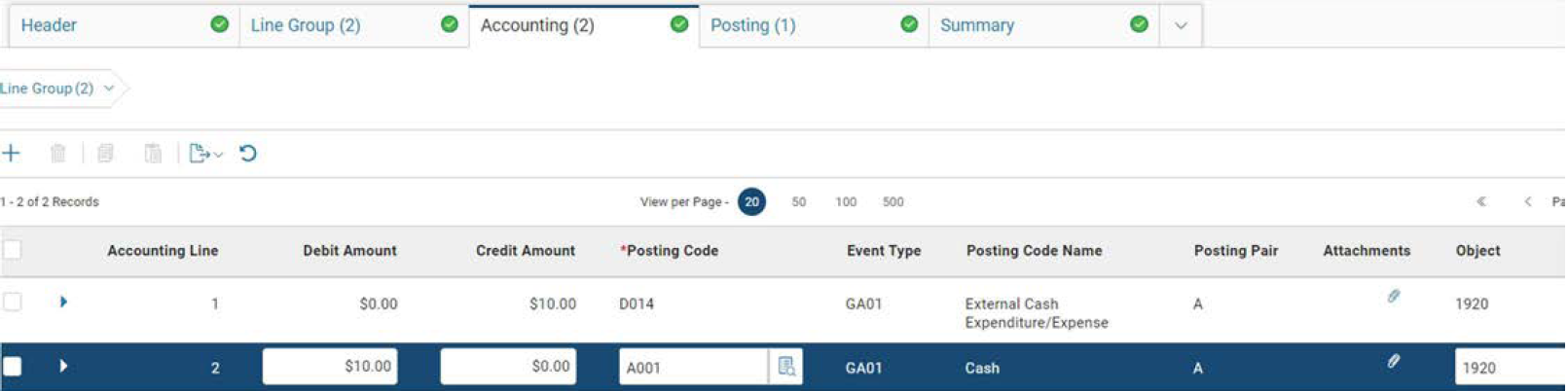
Under the second vendor line, this accounting line credits cash and re-records the transaction with the correct Object Code, completing the adjustment.
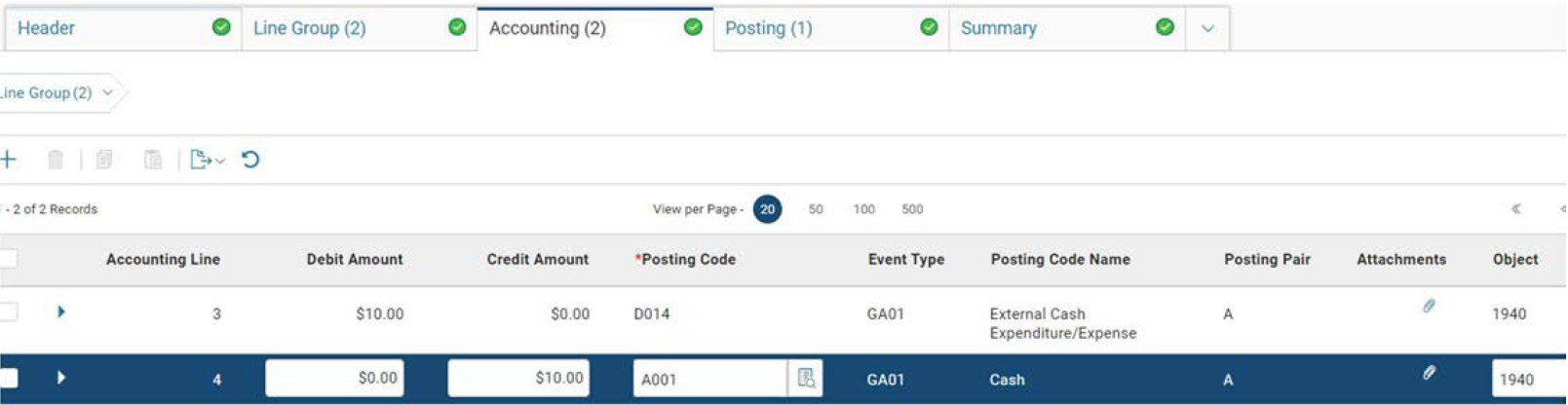
This JV will reduce reportable Nonemployee Compensation (OBJ 1920) by $10 and increase Medical and Health Care Payments (OBJ 1940) by $10 for vendor code VC00000000012902. There is no net impact on Cash.
Vendor code adjustment example: If an incorrect vendor code was used or a reportable payment was made on a miscellaneous vendor code, a JV is needed to correct the 1099 reporting. In this example, the original transaction was paid to a miscellaneous vendor (AAAA10000), but is reportable. Since miscellaneous vendors are not associated with a Taxpayer ID Number and never receive a 1099, the JV is used to increase the 1099 amount of the appropriate vendor (VC*014143).
| Transaction | Cash | AAAA10000 | Cash | VC*014143 | |
|---|---|---|---|---|---|
| Original Transaction | XX | ||||
| JV (misc/incorrect vendor code) | XX | ||||
| JV (correct vendor code) | XX | ||||
| 0 | XX |

In CORE, this JV looks like the images below:
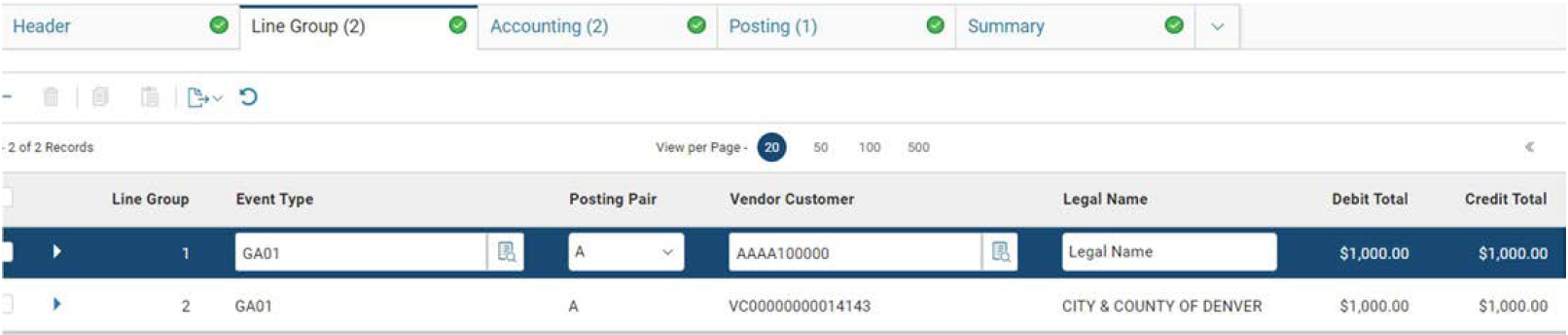
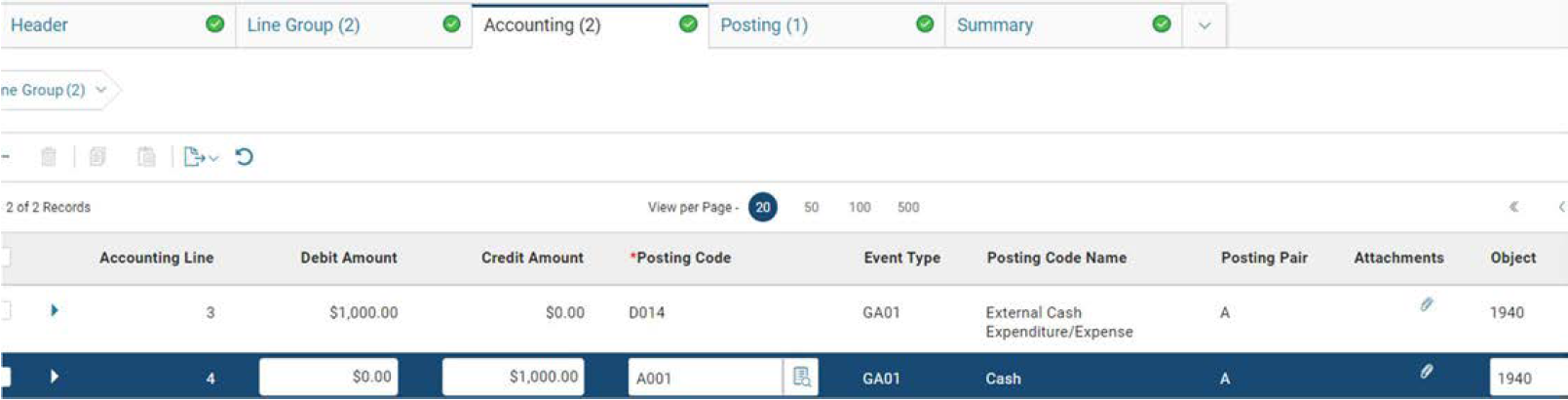
There are two vendor lines with different vendor codes. Under each vendor line, there are two accounting lines. This transaction will increase Nonemployee Compensation by $1,000 for vendor code VC00000000014143. The Cash credit increases the 1099 amount and is under the VC00000000014143 vendor line.
Appendix A: Object Code Lookup Table
| Object | Object Name | Form | Box | Income Type |
|---|---|---|---|---|
| 1310 | Honorarium | 1099-MISC | 3 | Other Income |
| 1330 | Board Member Compensation | 1099-NEC | 1 | Nonemployee Compensation |
| 1910 | Personal Services - Temporary | 1099-NEC | 1 | Nonemployee Compensation |
| 1920 | Personal Services - Professional | 1099-NEC | 1 | Nonemployee Compensation |
| 1930 | Purchased Services - Litigation | 1099-NEC | 1 | Nonemployee Compensation |
| 1935 | Personal Services - Legal Services | 1099-NEC | 1 | Nonemployee Compensation |
| 1940 | Personal Services - Medical Services | 1099-MISC | 6 | Medical and Health Care Payments |
| 1960 | Personal Services - Information Technology | 1099-MISC | 1 | Nonemployee Compensation |
| 2110 | Water and Sewer Services | 1099-NEC | 1 | Nonemployee Compensation |
| 2160 | Custodial/Cleaning/Waste Disposal Services | 1099-NEC | 1 | Nonemployee Compensation |
| 2180 | Grounds Maintenance | 1099-NEC | 1 | Nonemployee Compensation |
| 2210 | Other Maintenance | 1099-NEC | 1 | Nonemployee Compensation |
| 2220 | Building Maintenance | 1099-NEC | 1 | Nonemployee Compensation |
| 2230 | Equipment Maintenance | 1099-NEC | 1 | Nonemployee Compensation |
| 2231 | Information Technology Maintenance | 1099-NEC | 1 | Nonemployee Compensation |
| 2240 | Motor Vehicle Maintenance | 1099-NEC | 1 | Nonemployee Compensation |
| 2250 | Miscellaneous Rentals | 1099-MISC | 1 | Rents |
| 2253 | Rental of Equipment | 1099-MISC | 1 | Rents |
| 2254 | Rental of Motor Vehicles | 1099-MISC | 1 | Rents |
| 2255 | Rental of Buildings | 1099-MISC | 1 | Rents |
| 2256 | Rental of Land | 1099-MISC | 1 | Rents |
| 2258 | Parking Fees | 1099-MISC | 1 | Rents |
| 2260 | Rental - Information Technology | 1099-MISC | 1 | Rents |
| 2270 | Rental of Water Rights | 1099-MISC | 1 | Rents |
| 2310 | Purchased Construction Services | 1099-NEC | 1 | Nonemployee Compensation |
| 2311 | Construction Contractor Services | 1099-NEC | 1 | Nonemployee Compensation |
| 2312 | Construction Consultant Services | 1099-NEC | 1 | Nonemployee Compensation |
| 2610 | Advertising and Marketing | 1099-NEC | 1 | Nonemployee Compensation |
| 2640 | Mainframe Billings - Purchased Services | 1099-NEC | 1 | Nonemployee Compensation |
| 2641 | Other Automated Data Processing Billings-Purchased Services | 1099-NEC | 1 | Nonemployee Compensation |
| 2650 | Office of Information Technology Purchased Services | 1099-NEC | 1 | Nonemployee Compensation |
| 2680 | Printing and Reproduction Services | 1099-NEC | 1 | Nonemployee Compensation |
| 2690 | Legal Services | 1099-NEC | 1 | Nonemployee Compensation |
| 2710 | Purchased Medical Services | 1099-MISC | 6 | Medical and Health Care Payments |
| 2820 | Purchased Services | 1099-NEC | 1 | Nonemployee Compensation |
| 3126 | Repair and Maintenance | 1099-NEC | 1 | Nonemployee Compensation |
| 4111 | Prizes and Awards | 1099-MISC | 3 | Other Income |
| 4114 | Punitive Damages - Physical Injury/Illness | 1099-MISC | 3 | Other Income |
| 4115 | Punitive Damages - Other | 1099-MISC | 3 | Other Income |
| 4116 | Judgment Interest | 1099-INT | 1 | Interest Income |
| 4117 | Reportable Claims Against The State | 1099-MISC | 3 | Other Income |
| 4118 | Gross Proceeds To Attorneys | 1099-MISC | 10 | Gross Proceeds Paid to an Attorney |
| 4119 | Claimant Attorney Fees | 1099-NEC | 1 | Nonemployee Compensation |
| 411A | Juror Service Payments | 1099-MISC | 3 | Other Income |
| 4140 | Dues and Memberships | 1099-NEC | 1 | Nonemployee Compensation |
| 4150 | Interest Expense | 1099-INT | 1 | Interest Income |
| 4161 | Sales/Collection Commission Expenses | 1099-NEC | 1 | Nonemployee Compensation |
| 4162 | Bonus Expense | 1099-NEC | 1 | Nonemployee Compensation |
| 4163 | Promotional Ticket Expense | 1099-NEC | 1 | Nonemployee Compensation |
| 4182 | Official Functions - Rents | 1099-MISC | 1 | Rents |
| 4183 | Official Functions - Services | 1099-NEC | 1 | Nonemployee Compensation |
| 4190 | Patient and Client Care Expenses | 1099-NEC | 1 | Nonemployee Compensation |
| 4192 | Care and Subsistence - Other Vendor Services | 1099-NEC | 1 | Nonemployee Compensation |
| 4195 | Care and Subsistence - Rent To Owners | 1099-MISC | 1 | Rents |
| 4220 | Registration Fees | 1099-NEC | 1 | Nonemployee Compensation |
| 4230 | Royalties | 1099-MISC | 2 | Royalties |
| 5490 | Purchased Services for Non-Governmental Organizations | 1099-NEC | 1 | Nonemployee Compensation |
| 5775 | State Grant/Contract Intrafund | 1099-NEC | 3 | Other Income |
| 5776 | State Grant/Contract Interfund | 1099-MISC | 3 | Other Income |
| 5780 | Grants to Non-Governmental and Non-Subrecipient | 1099-MISC | 3 | Other Income |
| 5781 | Grants To Nongovernmental Organizations | 1099-MISC | 3 | Other Income |
| 5782 | Grants To Nongovernmental Organizations - Federal Pass Thru | 1099-MISC | 3 | Other Income |
| 5791 | Grants To Individuals | 1099-MISC | 3 | Other Income |
| 5880 | Distributions to Nongovernmental Organizations | 1099-MISC | 3 | Other Income |
| 5881 | Distributions to Nongovernmental Orgns - Fed Pass Thru | 1099-MISC | 3 | Other Income |
| 5891 | Distributions To Individuals | 1099-MISC | 3 | Other Income |
| 6315 | Buildings - RTU Lease | 1099-MISC | 1 | Rents |
| 6325 | Land - RTU Lease | 1099-MISC | 1 | Rents |
| 6335 | Land Improvement - RTU Lease | 1099-MISC | 1 | Rents |
| 6345 | Leasehold Improvements - RTU Lease | 1099-MISC | 1 | Rents |
| 6385 | Other Real Property - RTU Lease | 1099-MISC | 1 | Rents |
| 6415 | Information Technology - RTU Lease | 1099-MISC | 1 | Rents |
| 6425 | Furniture and Fixtures - RTU Lease | 1099-MISC | 1 | Rents |
| 6435 | Motor Vehicle/Boats/Planes - RTU Lease | 1099-MISC | 1 | Rents |
| 6465 | Laboratory Equipment - RTU Lease | 1099-MISC | 1 | Rents |
| 6485 | Other Capital Equipment - RTU Lease | 1099-MISC | 1 | Rents |
| 6489 | SBITA - Right to Use | 1099-NEC | 1 | Nonemployee Compensation |
| 6510 | Capitalized Professional Services | 1099-NEC | 1 | Nonemployee Compensation |
| 6511 | Capitalized Personal Services - Information Technology | 1099-NEC | 1 | Nonemployee Compensation |
| 6640 | Lease Component Principal Expenditure | 1099-MISC | 1 | Rents |
| 6641 | SBITA Component Principal | 1099-NEC | 1 | Nonemployee Compensation |
| 6720 | Bond/Note/Certificate of Participation Interest | 1099-INT | 8 | Tax Exempt Interest |
| 6760 | Financed Purchase Interest | 1099-INT | 1 | Interest Income |
| 6810 | Capital Lease Principal | 1099-MISC | 1 | Rents |
| 6820 | Capital Lease Interest | 1099-INT | 1 | Interest Income |
| 6830 | Nonlease Component | 1099-MISC | 1 | Rents |
| 6840 | Lease Component Interest | 1099-MISC | 1 | Rents |
| 6841 | SBITA Component Interest | 1099-NEC | 1 | Nonemployee Compensation |
| 8120 | Cost of Issuance - Governmental Funds | 1099-NEC | 1 | Nonemployee Compensation |
There are two new reportable Object Codes for Tax Year 2025:
| Object | Object Name | Form | Box | Income Type |
|---|---|---|---|---|
| 5775 | State Grant/Contract Intrafund | 1099-MISC | 3 | Other Income |
| 5776 | State Grant/Contract Intrafund | 1099-MISC | 3 | Other Income |
Appendix B: Frequently Asked Questions
How should parts and/or materials be coded?
Answer: Per the IRS: Payment for services, including payment for parts or materials used to perform the services if supplying the parts or materials was incidental to providing the service. For example, report the total insurance company payments to an auto repair shop under a repair contract showing an amount for labor and another amount for parts, if furnishing parts was incidental to repairing the auto.
What if a reportable payment escheats?
Answer: The payment is still reportable based on the Issue/Record Date. The funds will typically be available for the vendor to claim through Treasury's Unclaimed Property website. Payments from the state's Unclaimed Property Fund are not 1099 reportable.
What if a payment is cancelled or reissued?
Answer: If a payment is cancelled, it will reverse the reportable 1099 amount on the day it is cancelled. This means that if you cancel a 2020 payment in 2021, it will reverse the amount on the vendor's 2021 1099. For a reissued warrant, the reportable amount is increased and also reduced that same day, so there is no net impact.
What if a payment is intercepted?
Answer: Intercepted or offset amounts satisfy a vendor's debt and are therefore still considered income and potentially taxable.
What if a vendor needs a duplicate 1099?
Answer: You or the vendor can email CAVO at state_centralapproval@state.co.us to request a vendor’s 1099. Please provide the vendor’s name and vendor code along with the tax year(s) of the requested 1099(s). Please ensure the vendors address is correct and help them to update it if needed. Vendors contacting us directly will need to provide the last four of their Taxpayer ID Number and their Legal Name.:
What if a vendor doesn’t agree with the amounts on their 1099?
Answer: We recommend reviewing their Vendor Transaction History and highlighting all reportable payments for that particular year. You can also use the VEND-002 report. If this does not resolve the issue, you or the vendor can email state_centralapproval@state.co.us. We generally will not issue a corrected 1099 unless the discrepancy was clearly the state's fault. See Section IV: Filing Dates, 1099 Corrections.
What if a vendor claims they did not receive a payment in the year it was reported?
Answer: CORE uses the Record Date of the disbursement transaction. A 1099 reportable EFT issued on December 31st, 2019 would not be deposited to the vendor’s bank account until January 3rd, 2020 (three business days), but it would be reportable on the vendor’s 2019 1099. Per the IRS, we are allowed to report in this manner since it is our standard policy and does not change from year to year.
What if a vendor has a question about a 1099 not issued by the Colorado Office of the State Controller (Payer TIN ending in -4739)?
Answer: We can only provide information related to 1099s with the -4739 Payer TIN, which will be the same for every 1099 issued out of CORE. Certain State agencies, including the Departments of Revenue, Labor and Employment, Human Services, Health Care Policy & Financing, and Higher Education, also issue 1099s. They use a different Payer TIN and need to handle questions related to their 1099s directly. Also, we do not have any information related to 1099s issued by other employers or private companies.
What if a payment was issued in error and/or the payee refunded my agency? How do I properly
record the CR?Answer: In order to reduce the 1099 amount, please be sure to record the CR using the appropriate vendor code and object code. Please contact state_centralapproval@state.co.us if you need to add a billing address or activate a vendor as a customer. The reversal will still be based on the Record Date of the CR and impact the 1099 for that tax year.
Appendix C: IRS Links and CAVO Resources
When researching Internal Revenue Code and federal tax reporting guidance, always go to the source, IRS.gov. Below are links and references that were used in preparation of this guide.
- General Instructions for Certain Information Returns
https://www.irs.gov/instructions/i1099gi - Instructions for Forms 1099-MISC and 1099-NEC
https://www.irs.gov/instructions/i1099mec - Instructions for Forms 1099-INT
https://www.irs.gov/instructions/i1099int - 1099-INT, 1099-MISC, and 1099-NEC blank forms (PDF)
https://www.irs.gov/pub/irs-pdf/f1099int.pdf
https://www.irs.gov/pub/irs-pdf/f1099msc.pdf
https://www.irs.gov/pub/irs-pdf/f1099nec.pdf
The Central Accounting and Vendor Operations (CAVO) colorado.gov page is https://osc.colorado.gov/financial-operations/central-accounting. This page provides an overview or the unit’s functions and certain guidance and policy documents.
CAVO’s guidance and forms are available in a Google Drive folder. Please email state_centralapproval@state.co.us for the link.
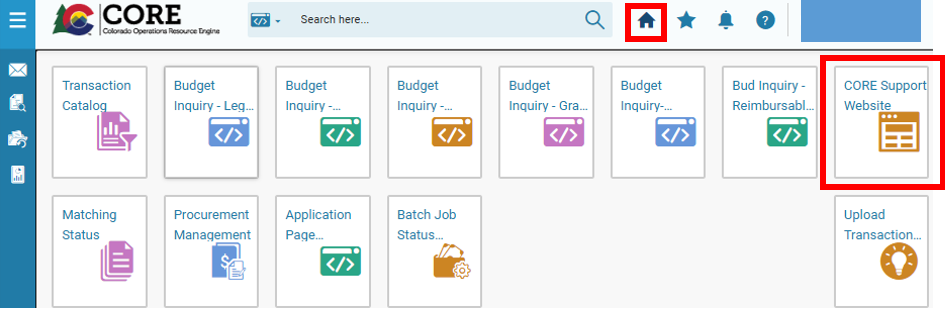
Additional resources can be found on the internal CORE Resources & Support Website. This site can be accessed from within CORE by clicking the link on the landing page as shown below.
As always, if you have any CORE federal tax (1099) reporting, vendor, or payment questions, please email state_centralapproval@state.co.us.