
CORE Warrant Escheatment Guide
Note: Provided below is guidance intended for State departmental and program use only. To view more guidance and policy information, please visit the Central Accounting and Vendor Operations page.
CORE Warrant Escheatment Guide
Table of Contents
Section I: Overview
Section II: Due Diligence
Section III: Cancelling or Reissuing Warrants
Section IV: Escheatment Process
Section V: After Escheatment
Appendix A: Escheatment Workflow Chart
Appendix B: Suggested Notice Text
Section I: Overview
Warrants issued from CORE expire six (6) months after date of issue.
State Statute requires uncashed State warrants to be escheated, or transferred to the State Treasury’s Unclaimed Property Fund once the warrant expires.
State Statute requires the paying department to perform “Due Diligence” a minimum of 60 days before the funds are transferred to Unclaimed Property.
Warrants that remain uncashed in the 7th month after they are issued will escheat, e.g. a warrant issued in April will escheat in November if uncashed.
The automated escheatment process in CORE occurs on the first Saturday of every month. This process is managed by the Central Accounting and Vendor Management Unit (CAVO).
Warrants must be cashed or cancelled prior to the automated escheatment process to avoid transfer to Unclaimed Property.
Section II: Due Diligence
What is Due Diligence?
Due diligence is the requirement that paying departments communicate with vendors that have an outstanding warrant that hasn’t yet been cashed. State Statute (C.R.S. 38-13-501) requires that the paying department perform due diligence a minimum of 60 days prior to the expiration of warrants in the amount of $25 or greater. The vendor has likely lost the warrant, but if they still possess the warrant and it has not yet escheated, they can cash it. See Appendix A for a chart of the escheatment/due diligence process.
We recommend that departments perform due diligence on a monthly basis for all outstanding warrants more than two months old. Due diligence notifications should include an Affidavit of Lost Warrant form in case the warrant is lost. Email is the preferred method of communication; if email is not an option, mailing a letter is the next preferred method.
Due diligence communication must include language that reads substantially as follows: “Notice. The State of Colorado requires us to notify you that your property may be transferred to the custody of the state treasurer if you do not contact us before [insert date that is thirty days after the date of this notice].”
Suggested notice text can be found on the last page of this guide in Appendix B.
Due diligence letters/emails do not need to be sent to the CAVO with warrant cancel/reissue paperwork.
Which Warrants Require Due Diligence?
Using InfoAdvantage Reports
The best InfoAdvantage report for determining which warrants remain uncashed is the AP-001 Warrant & EFT Status Listing by Bank Account report. This report will list all warrants that have not yet been cashed for the specified date range and cabinet/department. Example: It’s November 2019, and you’re about to perform due diligence for warrants issued in June 2019, because these warrants will escheat in January 2020.
Issue to Date: The beginning of the range, e.g. enter 06/01/2019.
Issue from Date: The end of the range, e.g. enter 6/30/2019.
Cabinet/Department: Use one or both of these fields, depending on the level of detail you need for your report.
Note: P-Card warrants are reported differently – contact CAVO with questions regarding these payments.
Using CORE
Jump To: CHREC, the Check Reconciliation table, will show warrants in “Warranted” status, meaning that the warrant has not yet been cashed. This status is updated nightly through the Check Reconciliation cycle.
Jump To: PDCHK, the Paid Check table, will show warrants with “Paid”, “Escheat”, or “Cancelled” status.
Section III: Cancelling or Reissuing Warrants
Cancel vs Reissue
A warrant should only be reissued if all payment details from the original warrant are the same. If anything needs to be changed, such as the vendor’s address, the amount, or chart of account elements, the payment should be cancelled instead.
If the payment needs to be manually reissued, submit documentation to cancel the existing warrant and recreate the original payment document (e.g IN, GAX, PRC, etc.). Note: encumbrances may need to be adjusted due to the warrant cancellation.
Cancel/Reissue Documentation
Please submit either a Warrant Cancellation Request form OR Warrant Reissue Request form, along with the required documentation, to the CAVO for processing. Refer to the CAVO webpage for the most updated process on how to request warrant cancellations and reissues.
Section IV: Escheatment Process
On the first Saturday of the 7th month after an uncashed warrant is issued, it will automatically escheat. For example, a warrant issued in October 2019 will escheat, if uncashed, on May 2nd, 2020. This process is automated within CORE.
Please note that Treasury does not transfer some warrants or parts thereof, such as federal funds, fund 7010 (CDLE), and specific cash funds from DNR, to Unclaimed Property. All though the warrant is still escheated, these funds typically remain in the department’s BSA 2751.
Section V: After Escheatment
Vendor Requests
If contacted by a vendor for payment that has escheated, the Department should refer the vendor to Great Colorado Payback (GCP), Treasury’s Unclaimed Property Website, search for their payment, and file a claim. The department can also submit a Holder Reimbursement Form to Treasury and request funds transferred to Unclaimed Property back from Treasury. In either case,
please advise the vendor that there may be a delay in reclaiming funds from GCP.
Escheatment Reporting Tools
AP-013 - Escheated Warrant Listing by Cabinet and Department: Provides a list of all escheated warrants that can be sorted by cabinet, department, and warrant number for a specified date range, i.e. 7/1/2019 to 9/30/2019, will show warrants that escheated during that time.
AP-014 - Escheatment Detailed Transaction Listing: Provides accounting details for the DC escheated warrant documents with various sorting options like warrant number and department. Use the dates that the warrants escheated, not the warrant issue dates.
Report includes several tabs to be used by Departments and Treasury:
- Detail TRN List – Accounting details of the DC document for warrants that have been escheated.
- Detail TRN List Excl Federal Funds - Accounting details of the DC document for warrants, excluding Federal Appropriations and CDLE fund 7010, that have been escheated and will be sent to GCP.
- Detail TRN List Exclusions - Accounting details of the DC document for warrants, items that were excluded from GCP reporting (Federal Appropriations and CDLE fund 7010)
- Treasury BSA 2751 – Accounting details for BSA 2751 for warrants that have been escheated.
- Treasury BSA 2751 Excl Federal Funds – Accounting details for BSA 2751 for warrants, excluding Federal Appropriations and CDLE fund 7010. Note: This is used by Treasury to create details for IET document to transfer funds to GCP and by DNR to determine any warrants that should be excluded from GCP reporting.
- Treasury BSA 2751 Exclusions - Accounting details for BSA 2751 for warrants, items that were excluded from GCP reporting (Federal Appropriations and CDLE fund 7010)
AP-015 - Escheated Warrants Reported to Unclaimed Property (IET Detail): Provides details (warrant and accounting) for the IET document created to send escheated warrants to Unclaimed Property, reconciliation of IET to GCP upload, shows amounts sent from 2751 account to GCP.
Appendix A – Escheatment Workflow Chart
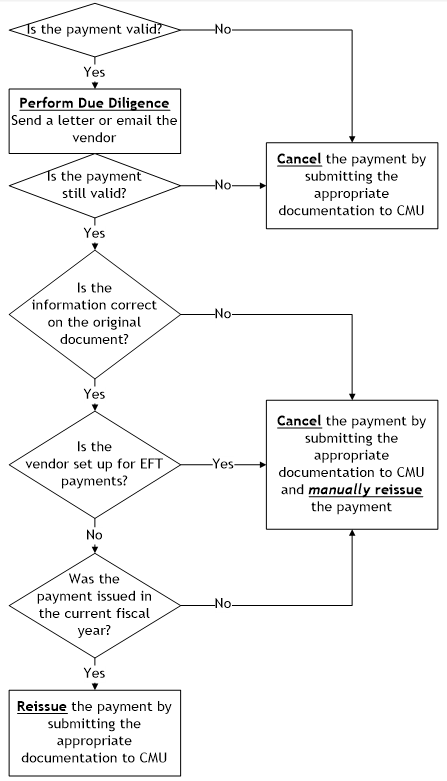
Is the payment valid?
- No - Cancel the payment by submitting the appropriate documentation to CAVO
- Yes - Perform Due Diligence by sending a letter or email the vendor
- Is the payment still valid?
- No - Cancel the payment by submitting the appropriate documentation to CAVO
- Yes - Is the information correct on the original document?
- No - Cancel the payment by submitting the appropriate documentation to CAVO and manually reissue the payment
- Yes - Is the vendor set up for EFT payments?
- Yes - Cancel the payment by submitting the appropriate documentation to CAVO and manually reissue the payment
- No - Was the payment issued in the current fiscal year?
- No - Cancel the payment by submitting the appropriate documentation to CAVO and manually reissue the payment
- Yes - Reissue the payment by submitting the appropriate documentation to CAVO
- Is the payment still valid?
Appendix B – Suggested Notice Text
[insert recipient contact info]
Greetings,
Our records indicate that you have (an) uncashed payment(s) issued by the State of Colorado.
[insert warrant details, include check description/invoice number and more information if possible]
The State of Colorado requires us to notify you that your property may be transferred to the custody of the state treasurer if you do not contact us before [insert date that is thirty days after the date of this notice]. C.R.S. 38-13-501. Payment recovery may be delayed up to two months after the funds are transferred to the Great Colorado Payback.
If you have an interest in these funds and wish to prevent the funds from being transferred to the State Treasury as unclaimed property, please complete the included Affidavit of Lost Warrant OR return the warrant(s) listed above. If our records show an incorrect address and/or incorrect information, please contact the department. The State of Colorado also offers Electronic Funds
Transfer (EFT) payment, which can be set up with the paying state agency.
Please send the completed Affidavit of Lost Warrant to:
[insert agency contact info; include mailing address as well as email address]
If a response is not received, the funds will be considered unclaimed and may be transferred to the Great Colorado Payback, which can be recovered at https://colorado.findyourunclaimedproperty.com/