Vendor Customer Creation Policy
Note: Provided below is guidance intended for State departmental and program use only. To view more guidance and policy information, please visit the Central Accounting and Vendor Operations page.
Title of Policy: Vendor Customer Creation
Approved by: State Controller
Approved Date: 07/12/2017
Revision Date: 07/12/2017
Table of Contents
Process Group Description: Vendor Customer Creation
Policy Statement VCUST.PO.01 Vendor and Customer Creation
Procedure(s) - (See detailed step action guides for CAVO processes.)
Procedure VCUST.PR.01.01 Vendor and Customer Creation by Department
Procedure VCUST.PR.01.02 Miscellaneous Vendor Customer
Procedure VCUST.PR.01.03 Vendor Creation through the Vendor Self Service Module (VSS)
VCUST.PM.01 Process Map – Vendor Customer Creation
Process Group Description: Vendor Customer Creation
The Vendor/Customer (VCUST) table maintains the primary information for a vendor/customer. Additional tables also contain information about vendors and customers and can be accessed through the VCUST table. Vendors and customers are used in the following areas:
- Procurement
- Accounts Payable
- Fixed Assets
- General Accounting
- Treasury Accounting
- Accounts Receivable
- Cost Accounting
- Grant Lifecycle Management
- Inventory
Rationale or background to policy:
This policy is required to keep the information on the VCUST table accurate and standardized. There will no longer be separate tables for vendor and Customer records. Rather, CORE combines the vendor and customer records together into a single table labelled VCUST. A record can be a vendor, customer, or vendor and customer. A vendor/customer record must exist prior to creating most documents.
Policy Statement VCUST.PO.01 Vendor and Customer Creation
Departments shall setup new vendors and customers into CORE. Vendors will also be able to register through the Vendor Self Service Module (VSS) to setup and modify their vendor record. Once the vendor is setup through VSS, vendor must make all modifications to record with the exception of setup of the Electronic Funds Transfer (EFT) details.
Each vendor shall provide W-9 or W-8 information to the Departments prior to activation. Duplicate records will not be entered into the CORE system.
All vendors will be certified through the IRS TIN matching system. Payment to the vendor must be delayed for two business days after the vendor is created to ensure TIN matching certification is complete.
Cabinets will be allowed 2 employees to be assigned the security role to create new vendors. Exceptions can be granted for large Cabinets and Cabinets that have non-centralized locations. These employees mush have passed at minimum a criminal background check within the last year or upon hiring by your Department prior to being granted this security.
To reduce risk of duplicate payments, Departments shall use headquarter accounts with various address ID’s if needed for alternate naming, billing, payment needs rather than branch accounts.
Each Department will be allotted one Miscellaneous Vendor/Customer record. The Miscellaneous VCUST record will follow this format DEPT100000, example ACAA100000. Departments may use the Miscellaneous VCUST record if completing payment to vendor that is not 1099 reportable, payment requires multiple names i.e. settlements, or to process cash receipt where there is no known customer information.
Vendors and customers created by departments will be activated upon submission as long as the required documentation has been attached, the 1099 classification is not “other” and the record is a headquarter record. If the above requirements are not met, the document will route to the Central Accounting and Vendor Operations (CAVO) workflow for review.
To reduce cost to the State, Electronic Funds Transfers (EFT) should be used for payment rather than a warrant whenever possible. All EFT data will be setup at a central level but verified by the Department with the vendor to reduce risk of fraud.
Departments with payment systems external to CORE must have policy and procedures in place for vendor and EFT management with the same level of controls outlined in the OSC Policy.
VCUST record numbers should be auto–numbered with the following exceptions:
For employee records, the VCUST record number shall be the employee identification number followed by an E i.e. 9971111111E. A W-9 does not need to be obtained from the employee as the payroll system details and documentation are used.
Department of Healthcare Policy and Finance (HCPF) had VCUST numbers for their providers that began with UM but are now discontinued as all payments are issued from an external system. HCPF was responsible for keeping their W-9 forms for these vendors.
Judicial juror vendors added by a interface into CORE shall be numbered by their external system identifying the year and case number they served under. The number will never be an SSN or TIN. W-9 Forms will be retained by the Department.
Colorado Department of Human Service (CDHS) providers shall have special VCUST numbers that begin with UDXXXXXXXX.
Procedure VCUST.PR.01.01 Vendor and Customer Creation by Department
Overview: Departments will create vendor or customer records.
Document Creation: VCC documents will be completed for the creation of a single vendor or customer. VCC1 documents will be used when multiple vendors or customers are created using an interface.
Most information to complete a VCC document will be found on the W-9/W-8 form completed by the vendor. Prior to creating a new VCUST vendor or customer, Departments are required to search for the TIN number or legal name, last name or DBA to verify that the record does not currently exist as a VCUST record.
Requirements and Restrictions:
W-9 forms are required for all new vendors. Departments should use the standardized substitute W-9 form created by Office of State Controller. Customer only records will not require a W-9 form.
The completed W-9 form (or W-8 form for foreign vendors) is to be attached to the VCC document prior to finalizing the document. Any VCC document without an attachment will be directed through workflow to the CAVO and the vendor will not be available for use until the W-9 (or W-8) has been submitted. Exception: There is no provision for attaching W-9 documents to VCUST records added using an interface.
Departments adding VCUST records through an interface must retain the W-9 documents.
To create a new foreign vendor, contact the CAVO for assistance.
EFT data cannot be setup with the initial creation of the vendor. All EFT data will be setup at a central level
but verified by the Department with the vendor to reduce risk of fraud. Department should use OSC EFT
form. Employee EFT data is loaded directly into CORE from the state payroll system.
Procedure VCUST.PR.01.02 Miscellaneous Vendor Customer
Overview: Departments may use the Miscellaneous VCUST record if completing payment to vendor that is not 1099 reportable, payment requires multiple names i.e. settlements, or to process cash receipt where there is no known customer information.
Document Creation: Each Department should need only one Misc Vendor Customer record. If your Department requires multiple Misc VCUST records, documentation will be required to validate the business reason.
Procedure VCUST.PR.01.03 Vendor Creation through the Vendor Self Service Module (VSS)
Overview: Vendors will be able to self register through the Vendor Self Service Module (VSS) creating a vendor record. The registration will update the VCUST table and create a VCM document to activate the vendor in CORE. The vendor will not be immediately activated. The VCM document will need approval from the Central Management Unit before the VCUST record can be used for any documents.
Document Creation: The vendor will electronically sign a Memorandum of Agreement that will also serve as a substitute W-9 form. Vendors will not have the option for entering EFT information through VSS but will work with paying Departments to setup EFT before payments are due.
If data is not completed accurately by the vendor, the CAVO will reject the VCM document which deactivates the vendor record so cannot be used. The vendor is notified of the rejection and reason to allow vendor to make correction.
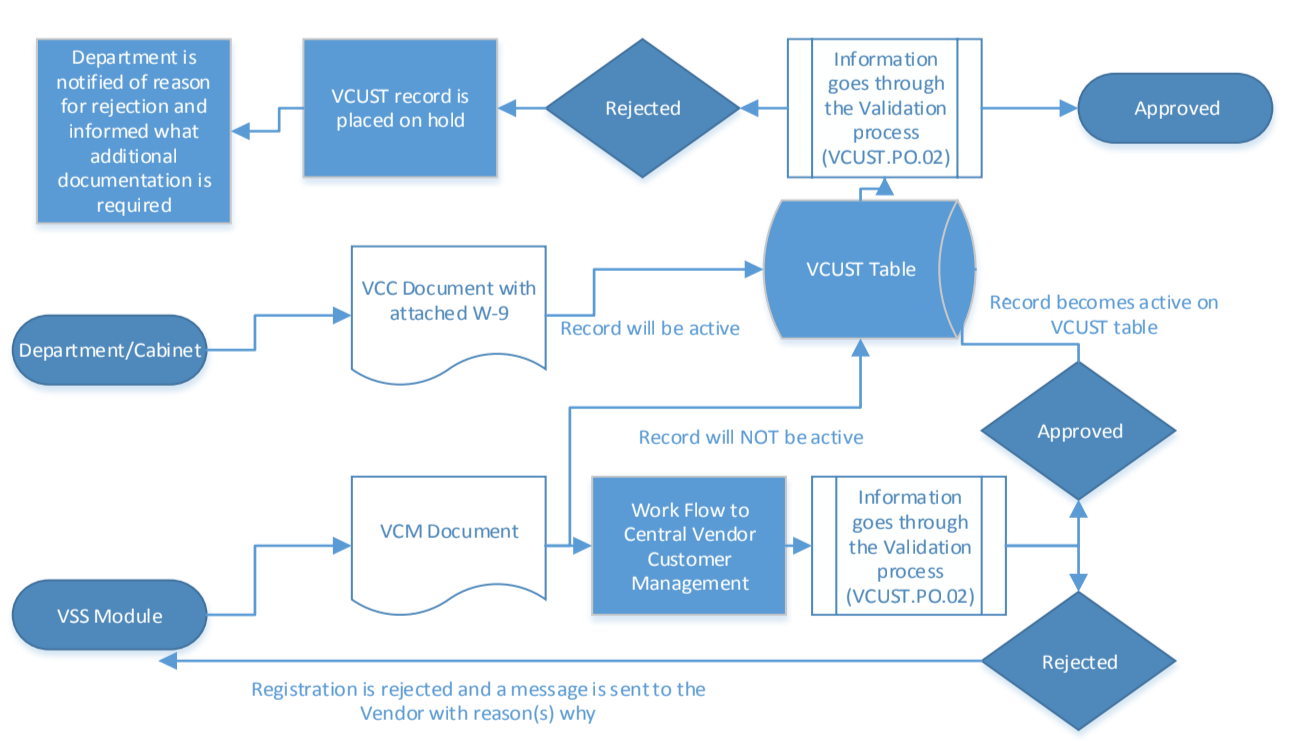
VCUST.PM.01 Process Map – Vendor Customer Creation
Department/Cabinet
- VCC Transaction with attached W-9
- Record will start as active on the VCUST Table
- Information goes through the Validation process (VCUST.PO.02)
- Approved
- Rejected - VCUST record is placed on hold & department is notified of reason for rejection and informed what additional documentation is required
VSS Module
- VCM Transaction
- VCUST table record will be inactive
- VCM routed to Central Accounting and Vendor Operations Customer Management
- Information goes through Validation process VCUST.PO.02
- Approved - Record become active on the VCUST table
- Rejected - Registration is rejected and message is sent to the Vendor with reason(s) why.